> For the complete documentation index, see [llms.txt](https://htooaunklinn-organization.gitbook.io/htooaunklinn-docs/llms.txt). Markdown versions of documentation pages are available by appending `.md` to page URLs; this page is available as [Markdown](https://htooaunklinn-organization.gitbook.io/htooaunklinn-docs/hardware-and-iot/arduino-on-macos/page-1.md).
# Page 1
```cpp
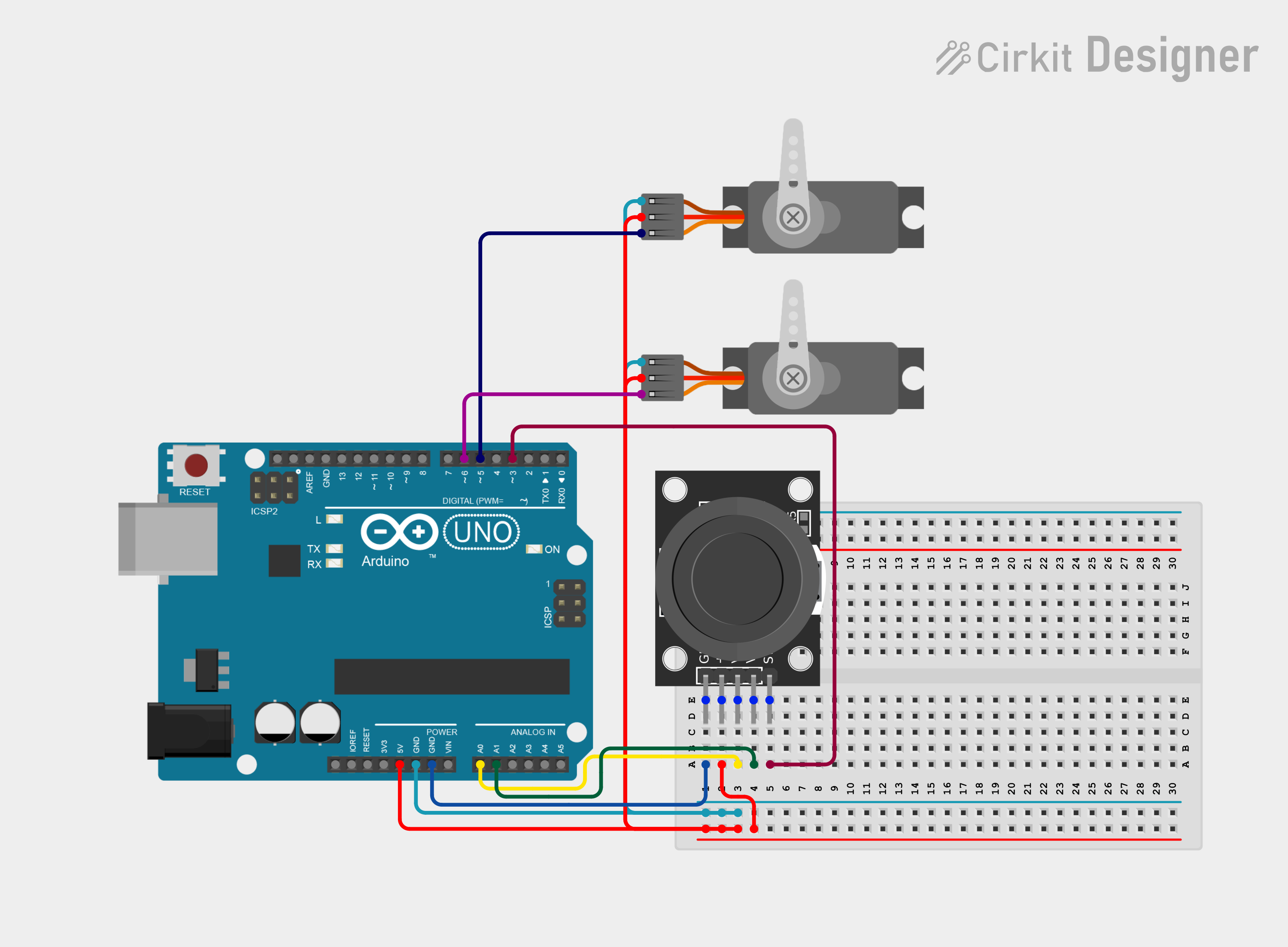
#include
// Define pins for joystick
const int VRxPin = A0;
const int VRyPin = A1;
const int SWPin = 3;
// Define pins for servos
const int servo1Pin = 5;
const int servo2Pin = 6;
// Create servo objects
Servo servo1;
Servo servo2;
void setup() {
// Initialize serial communication
Serial.begin(9600);
// Attach servos to their respective pins
servo1.attach(servo1Pin);
servo2.attach(servo2Pin);
// Set the switch pin as input
pinMode(SWPin, INPUT_PULLUP);
}
void loop() {
// Read joystick values
int VRxValue = analogRead(VRxPin);
int VRyValue = analogRead(VRyPin);
int SWValue = digitalRead(SWPin);
// Map joystick values to servo angles (0 to 180 degrees)
int servo1Angle = map(VRxValue, 0, 1023, 0, 180);
int servo2Angle = map(VRyValue, 0, 1023, 0, 180);
// Write angles to servos
servo1.write(servo1Angle);
servo2.write(servo2Angle);
// Print joystick values and switch state to serial monitor
Serial.print("VRx: ");
Serial.print(VRxValue);
Serial.print(" | VRy: ");
Serial.print(VRyValue);
Serial.print(" | SW: ");
Serial.println(SWValue);
// Add a small delay to avoid overwhelming the serial monitor
delay(100);
}
```